Three.js + Vite · WebGL 模型检视器 Three.js + Vite · WebGL Model Inspector

Model Inspector

交互式 3D 数字资产与模型检视器:工业级三点布光、程序化展台底座、PBR 材质检视模式、拖拽载入 .glb / .gltf、一键导出 4K 透明背景 PNG——全部贴图由代码程序化生成,零外部资源、完全离线可用。 An interactive 3D digital-asset and model inspector: industrial three-point lighting, a procedural pedestal, PBR material inspection modes, drag-and-drop .glb / .gltf loading, and one-click 4K transparent-background PNG export — every texture is generated procedurally in code, with zero external assets and full offline availability.

Three.js r170 Vite 5 运行时依赖 仅 threeRuntime dep three only Node.js ≥ 18 离线可用 · 无外部资源Offline · no external assets
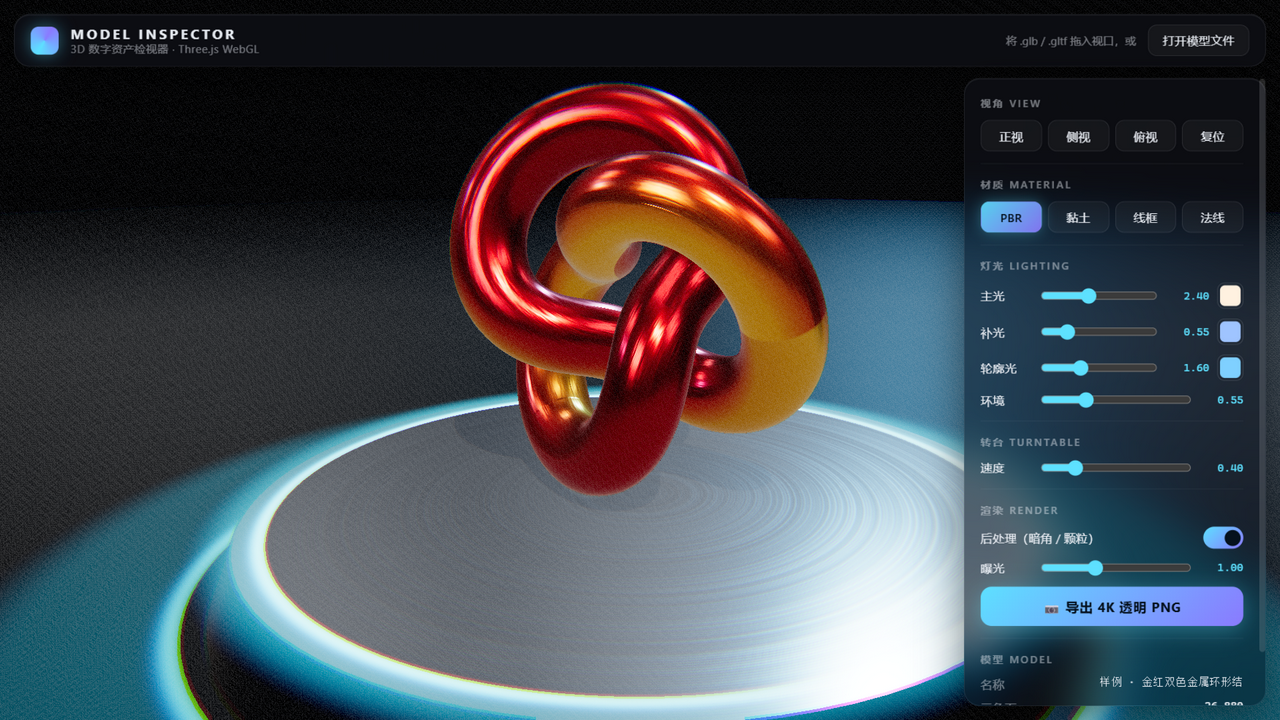
Model Inspector 运行截图:金红双色金属环形结悬于发光的程序化展台上方,右侧为磨砂玻璃控制面板 / Model Inspector screenshot: a gold-red metal torus knot floats above the glowing procedural pedestal, glass control panel on the right
实际运行画面(1280 × 720):默认样例「金红双色金属环形结」与脉动辉光展台 Live capture (1280 × 720): the default gold-red metal torus-knot sample on the pulsing glow pedestal
3840px 4K 透明背景 PNG 导出长边Long edge of the 4K transparent PNG export
3 + 1 主光 / 补光 / 轮廓光 + 半球底光Key / fill / rim lights + hemisphere base light
4 PBR / 黏土 / 线框 / 法线检视模式PBR / clay / wireframe / normal inspection modes
0 外部贴图与网络请求,全部程序化生成External textures or network requests — all procedural

Features

为「看清楚一个模型」而设计的检视器 A viewer built to see a model clearly

从布光、展台、材质到导出,每个环节都围绕一件事:把 3D 数字资产放在一个稳定、可复现的舞台上,任意角度地检视它。 Lighting, staging, materials, export — every part serves one goal: put a 3D digital asset on a stable, reproducible stage and inspect it from any angle.

工业级三点布光Industrial three-point lighting

暖色主光投射 2048 × 2048 动态软阴影,冷色补光柔化暗部,背后轮廓光勾出边缘,再叠一层半球底光避免死黑——每盏灯的颜色与强度都实时可调。 A warm key light casting 2048 × 2048 soft dynamic shadows, a cool fill light lifting the shadows, a rim light carving the silhouette, plus a hemisphere base light against pitch black — color and intensity of every light adjustable in real time.

程序化展台底座Procedural pedestal

微锥度金属圆盘 + 同心拉丝顶面 + 接地 AO 径向渐变地面;顶缘辉光环与地面晕圈由自定义 GLSL 着色器渲染,带时间脉动与三瓣旋转扫光。 A micro-tapered metal disc with a concentric brushed-metal top and a radial ground-AO gradient floor; the glowing rim ring and floor halo are rendered by custom GLSL shaders with time-based pulsing and a three-lobe rotating sweep.

PBR 材质检视模式PBR material inspection modes

标准 PBR / 纯白黏土 / 拓扑线框 / 法线检查四模式一键切换(快捷键 1–4);切换时原始材质被缓存,回到 PBR 自动还原。 One click (or keys 1–4) switches between standard PBR, matte white clay, wireframe topology, and normal-map check modes; original materials are cached and restored when you switch back to PBR.

拖拽载入 glb / gltfDrag-and-drop glb / gltf loading

把模型文件直接拖进浏览器窗口:.glb 单文件直读;.gltf 连同引用的 .bin 与贴图一起拖入,通过 blob URL 映射在无服务器环境下完成解析。也可点击顶栏「打开模型文件」。 Drop model files straight into the browser window: a single .glb parses directly; a .gltf can be thrown in together with its referenced .bin and textures, resolved via a blob-URL mapping with no local server. The top-bar “Open model file” button works too.

自动取景与显存管理Auto framing & GPU memory care

载入新模型前自动卸载旧模型并逐项释放几何 / 材质 / 贴图;随后按包围盒归一化缩放、居中落于展台,依视场角计算相机距离并平滑补间过渡,任意模型开箱即完整入画。 Loading a new model first disposes the old one — geometries, materials and textures, item by item; the new model is then normalized by bounding box, centered on the pedestal, and the camera distance is computed from the field of view with a smooth tween, so any model is fully framed out of the box.

视角预设与无级转台View presets & stepless turntable

正视 / 侧视 / 俯视 / 透视复位四组预设,切换带阻尼补间;转台 0–2 rad/s 无级调速自动旋转,空格键随时暂停 / 恢复,双击视口回到默认 3/4 视角。 Four presets — front, side, top and perspective reset — transition with damped easing; the turntable spins steplessly from 0 to 2 rad/s, Space pauses and resumes, and double-clicking the viewport returns to the default 3/4 view.

4K 透明背景导出4K transparent export

一键渲染长边 3840px 的透明背景 PNG,仅含模型本体:导出瞬间隐藏展台与场景背景,离屏渲染后回读像素、垂直翻转、编码下载,最后完整还原取景现场。 One click renders a transparent-background PNG with a 3840px long edge, model only: the pedestal and scene background are hidden for the shot, pixels are read back off-screen, flipped, encoded and downloaded — then the entire scene state is restored.

零外部资源,离线可用Zero external assets, fully offline

金红金属底色、铸造锤纹法线、AO 渐变、拉丝粗糙度——全部贴图由 Canvas 在运行时程序化生成,断网可用,运行时依赖只有 three 一个包。 Gold-red base color, cast-hammered normal map, AO gradient, brushed roughness — every texture is generated procedurally on a Canvas at runtime. Works with no network; the only runtime dependency is three.
Controls

界面与操作 Interface & Controls

全屏视口 + 磨砂玻璃控制面板:一只鼠标、三个快捷键,就能完成从载入到导出的全部检视流程。 A full-screen viewport plus a frosted-glass control panel: one mouse and three shortcuts cover the whole inspect-and-export workflow.

控制面板局部:视角、材料、灯光、转台、渲染与模型信息分区 / Control panel detail: view, material, lighting, turntable, render and model-info sections
右侧控制面板(运行截图局部):视角 / 材料 / 灯光 / 转台 / 渲染 / 模型信息 The right-side control panel (cropped from the live screenshot): views / material / lighting / turntable / render / model info

鼠标Mouse

  • 左键拖拽Left-drag旋转视角Orbit the camera
  • 滚轮Wheel缩放视距Zoom in / out
  • 右键拖拽Right-drag平移视角Pan the view
  • 双击视口Double-click复位到默认 3/4 视角Reset to the default 3/4 view

键盘快捷键Keyboard shortcuts

  • 1 2 3 4切换 PBR / 黏土 / 线框 / 法线模式Switch PBR / clay / wireframe / normal modes
  • F复位到默认 3/4 视角Reset to the default 3/4 view
  • 空格Space暂停 / 恢复转台旋转Pause / resume turntable rotation

控制面板Control panel

灯光颜色与强度、环境反射强度、转台速度、曝光、后处理开关、视角预设、材质模式与 4K 导出按钮集中在右侧磨砂玻璃面板;模型区实时回显文件名、三角面数、顶点数、材质 / 贴图计数、包围盒尺寸与 FPS。 The frosted-glass panel on the right gathers light color & intensity, environment intensity, turntable speed, exposure, a post-processing toggle, view presets, material modes and the 4K export button; the model section echoes the file name, triangle count, vertex count, material / texture counts, bounding-box size and live FPS.

Quick Start

本地跑起来,只要两步 Up and running in two steps

整个工程只有 three 与 vite 两个依赖,克隆后在项目根目录执行: The whole project has exactly two dependencies — three and vite. From the project root, run:

1

安装依赖Install dependencies

# 安装依赖(仅 three + vite)
npm install
# Install dependencies (three + vite only)
npm install
2

启动开发服务器Start the dev server

npm run dev
# 浏览器打开 http://localhost:5173
npm run dev
# Open http://localhost:5173 in the browser

也可以用 npx vite 免全局安装直接运行。启动后即见默认样例「金红双色金属环形结」悬于展台上方。 You can also run npx vite without a global install. The default sample — a gold-red two-tone metal torus knot — appears floating above the pedestal on startup.

3

生产构建与预览(可选)Production build & preview (optional)

npm run build     # 产物输出到 dist/
npm run preview   # 本地预览构建产物
npm run build     # Output to dist/
npm run preview   # Preview the build locally

要求 Node.js ≥ 18。工程所有贴图(金红金属、法线凹凸、AO 渐变)均由 Canvas 程序化生成,完全离线可用,无需任何外部资源。 Requires Node.js ≥ 18. All project textures (gold-red metal, normal bump, AO gradient) are generated procedurally on Canvas — fully offline, no external resources needed.

Under the Hood

技术实现 Under the Hood

没有引入任何渲染之外的库:布光、展台、后处理、导出全部手写在 Three.js r170 之上,源码合计六个模块。 No libraries beyond the renderer itself: lighting, staging, post-processing and export are all hand-written on top of Three.js r170, in six source modules.

渲染核心Render core

WebGLRenderer 开启抗锯齿与 preserveDrawingBuffer,像素比上限 2;ACES Filmic 色调映射、PCFSoft 软阴影;环境反射由 PMREM + RoomEnvironment 生成,强度默认 0.55 可调(viewer.js)。 WebGLRenderer with antialiasing and preserveDrawingBuffer, pixel ratio capped at 2; ACES Filmic tone mapping and PCFSoft shadows; environment reflections come from PMREM + RoomEnvironment, defaulting to an adjustable intensity of 0.55 (viewer.js).

布光参数Lighting rig

主光暖白 0xfff1e0 / 强度 2.4,2048² 阴影贴图;补光冷蓝 0x9fc4ff / 0.55;轮廓光青色 0x7fd0ff / 1.6;半球底光 0.35——颜色与强度全部面板实时可调。 Warm-white key light 0xfff1e0 at 2.4 with a 2048² shadow map; cool-blue fill 0x9fc4ff at 0.55; cyan rim 0x7fd0ff at 1.6; hemisphere base light at 0.35 — every color and intensity adjustable live from the panel.

自定义 GLSLCustom GLSL

底座辉光环着色器:高斯衰减的内缘炽热细线 + 时间脉动 + 三瓣旋转扫光,加法混合渲染(pedestal-glow.glsl.js);后处理合成通道:暗角、径向色差、动态胶片颗粒与亮度保持的饱和度提升(post-composite.glsl.js)。 The pedestal glow-ring shader: a Gaussian-falloff hot inner edge, time pulsing and a three-lobe rotating sweep, blended additively (pedestal-glow.glsl.js); the post-composite pass adds vignette, radial chromatic aberration, animated film grain and luma-preserving saturation (post-composite.glsl.js).

程序化贴图Procedural textures

值噪声 4 倍频高度场经 Sobel 梯度推导出铸造锤纹法线贴图;斜向金红渐变叠加微噪点作底色;地面径向渐变内置展台接地 AO 暗环;展台顶面为同心圆拉丝粗糙度贴图(materials.js)。 A 4-octave value-noise height field feeds a Sobel-gradient pass to derive the cast-hammered normal map; a diagonal gold-red gradient gets micro-noise for the base color; the floor’s radial gradient bakes a contact-AO dark ring; the pedestal top uses a concentric brushed-roughness map (materials.js).

模型装载管线Model loading pipeline

卸载旧模型并逐项 dispose → 归一化缩放(最大边 2.3)→ 居中落台(抬升 2mm 防止平底模型与台面 z-fighting)→ 包围球按视场角取景 → 统计三角面 / 顶点 / 材质 / 贴图(viewer.js)。 Dispose the old model item by item → normalize scale (max edge 2.3) → center onto the pedestal (lifted 2mm so flat bottoms don’t z-fight) → frame by bounding sphere and field of view → tally triangles / vertices / materials / textures (viewer.js).

glTF 拖拽解析glTF drag-and-drop parsing

.glb 以 ArrayBuffer 直读解析;.gltf 多文件混投时,以「文件名 → blob URL」映射表配合 LoadingManager.setURLModifier 重写资源引用,无需本地服务器(dragdrop.js)。 A .glb parses directly from its ArrayBuffer; when a .gltf is dropped together with its sidecars, a “filename → blob URL” map plus LoadingManager.setURLModifier rewrites every resource reference — no local server needed (dragdrop.js).

Project Layout

工程结构 Project Layout

六个源码模块,职责清晰:入口组装、渲染核心、面板绑定、拖拽解析、程序化材质与两段 GLSL。 Six source modules with clear responsibilities: entry wiring, render core, panel bindings, drag-and-drop parsing, procedural materials and two GLSL shaders.

├── index.html                        # UI 布局(磨砂玻璃面板)+ 全部样式
├── package.json                      # three + vite,dev / build / preview 脚本
└── src/
    ├── main.js                       # 入口:组装 viewer / gui / 拖拽载入
    ├── viewer.js                    # 渲染、三点布光、展台、后处理、4K 截图、模型装载
    ├── gui.js                        # 控制面板事件绑定与状态回显
    ├── dragdrop.js                   # 拖拽 + GLTF 多文件解析(URLModifier)
    ├── materials.js                  # 程序化贴图 + 材质四模式切换
    └── shaders/
        ├── pedestal-glow.glsl.js     # 底座发光环着色器(脉动 + 扫光)
        └── post-composite.glsl.js    # 后处理合成(暗角 / 色差 / 颗粒)
├── index.html                        # UI layout (glass panel) + all styles
├── package.json                      # three + vite; dev / build / preview scripts
└── src/
    ├── main.js                       # Entry: wires viewer / gui / drag-and-drop
    ├── viewer.js                    # Rendering, 3-point lights, pedestal, post FX, 4K capture, model loading
    ├── gui.js                        # Control-panel event bindings & state echo
    ├── dragdrop.js                   # Drag & drop + multi-file GLTF parsing (URLModifier)
    ├── materials.js                  # Procedural textures + four material modes
    └── shaders/
        ├── pedestal-glow.glsl.js     # Pedestal glow-ring shader (pulse + sweep)
        └── post-composite.glsl.js    # Post composite (vignette / aberration / grain)

Known Limits

已知限制 Known Limits

为了让运行时依赖只保留 three 一个包,两件事被有意排除在外。 Two things are deliberately left out to keep the runtime dependency list at exactly one package: three.

不支持压缩编码的 glTF No compressed glTF variants

不支持 Draco / KTX2 / Meshopt 压缩编码的 glTF——这是为保持零额外解码依赖、完全离线可用所做的取舍。 glTF files using Draco / KTX2 / Meshopt compression are not supported — a deliberate trade-off to keep zero extra decoder dependencies and full offline availability.

.gltf 外部资源需一并拖入 .gltf sidecars must be dropped together

若 .gltf 引用外部 .bin 或贴图文件,请将这些文件与 .gltf 一起拖入浏览器窗口,才能正确完成解析。 If a .gltf references external .bin or texture files, drop those files into the browser window together with the .gltf for parsing to succeed.

反馈 Feedback